


Classmates
3.0134.00 Reviews
App Specs
- Version
- 1.5.41
- Updated On
- License
- Free
- Downloads
- 50,000+
- Developer
- Classmates Mobile
- Categories
- Social
- Platform
- Android
Screenshots

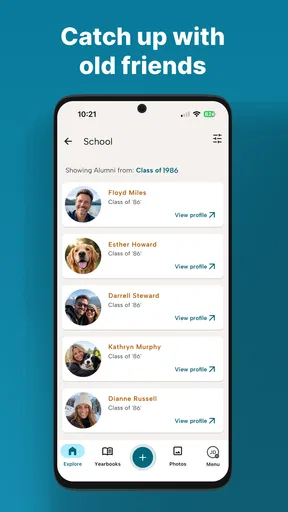

 Analysis by AppCompare
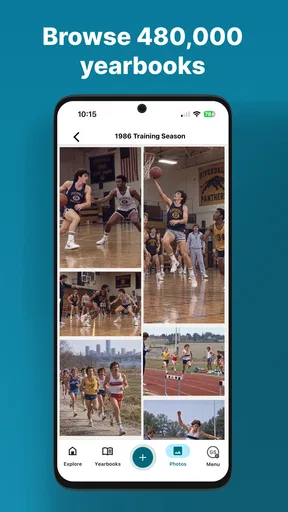
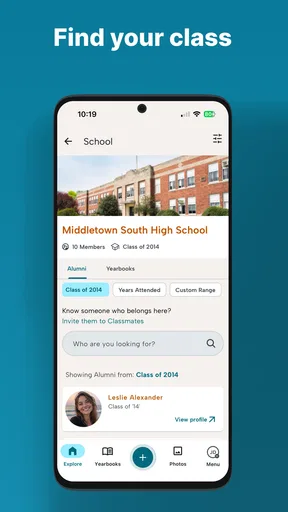
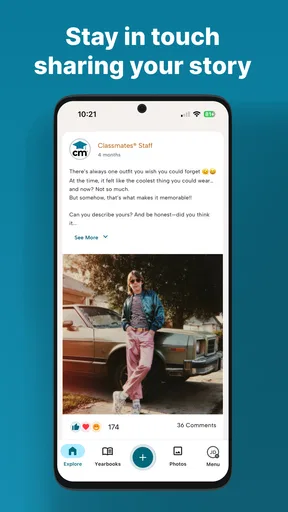
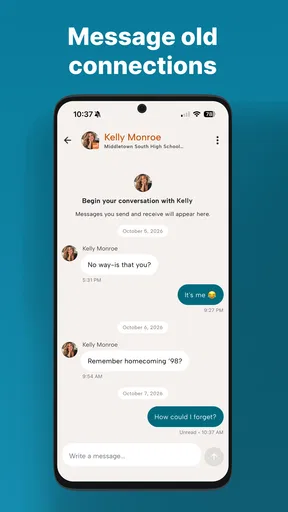
I approached Classmates as a social app for people who want a more focused way to stay connected with classmates and familiar school communities. Its appeal is easy to understand: instead of treating every online contact as part of one enormous audience, it points attention toward people linked by a shared educational setting. That narrower purpose can make conversations feel more relevant, but it also means the app’s value depends heavily on whether the right people are actually using it.
My overall impression is cautious rather than dismissive. Classmates is free to install, aimed at Teen users, and developed by Classmates Mobile. It has reached over 50 thousand installs, which suggests a real audience without making it feel like an unavoidable mainstream network. The average rating sits at 3.0 from around 259 ratings, so I would not recommend joining with the expectation of a universally polished experience. I would treat it as a community tool worth testing with a specific group, not as a complete replacement for every social platform already on your phone.
What the app is trying to make easier
The most useful way to think about this app is as a digital meeting point organized around classmates. That distinction matters. On a general social network, school-related posts compete with family updates, entertainment, public creators, advertising and unrelated recommendations. A class-focused service has a chance to reduce that noise and make a message about a reunion, shared assignment, school memory or local event more visible to the people who understand it.
I can imagine opening it after someone creates a group for an old class. The practical benefit is not necessarily constant entertainment; it is having one place to check when the conversation is tied to that particular group. If a former classmate wants to coordinate a get-together, ask whether anyone still has a photograph, or reconnect after years apart, a purpose-built social space can feel less awkward than searching through a large network and sending individual messages.
That focus is also the first important trade-off. A social app only becomes useful when your contacts, classmates or communities are present. If you install it alone and expect an active feed immediately, the experience may feel thin. I would first ask whether the people I actually want to reach already use Classmates. If they do not, a familiar messenger or the social network where your group already talks will probably be faster.
The app is best suited to people who enjoy community-based interaction rather than broad public discovery. It may work for students, former classmates, school groups and people rebuilding contact with an old circle. It is less convincing for someone looking for a general-purpose place to follow creators, discover breaking news, manage professional contacts or maintain a large public profile.
Trust starts with a narrow promise
For a social product, trust is not created by a friendly name alone. I look at whether the app’s purpose is understandable, whether its audience is clear and whether I can make sensible decisions before sharing anything. Classmates gives a reasonably clear starting point through its social category and school-oriented identity. That is more reassuring than an app with an unclear purpose, because I can judge whether its role fits my needs before creating an account.
Worth Reading Before You Choose

Flipboard Shows What News Apps Must Do Beyond the Feed

Switching to Android Auto Means Rethinking Your Driving Routine

Google Calendar Makes a Crowded Week Easier to Manage

Ludo King Makes the Most of the Minutes Between Plans

Baby Panda World Brings Quick Play to Modern Phones, but Its Game Library Feels Busy

ESPN’s Live Game View Makes Following Close Games Easier
Still, a focused theme should not be confused with automatic privacy. A classmate may be someone I know well, someone I barely remember or someone whose connection to a group is unclear. I would avoid treating a shared school background as permission to reveal personal details. My practical rule would be to begin with ordinary conversation and keep sensitive information out of public-facing areas until I understand exactly who can see it.
The Teen content rating is another reason I would encourage deliberate use. Younger users and families should discuss what kind of information belongs in a social profile, how to handle unwanted contact and when to stop engaging with someone who makes them uncomfortable. The rating does not tell me that every interaction will be suitable for every person, so basic online boundaries still matter.
Controls I would check before becoming active
Before posting, I would spend a few minutes looking through the account and privacy areas for the controls that affect visibility, contact and notifications. I would pay particular attention to who can find the account, who can send messages or requests, whether profile details can be edited or removed, and how to report or block another user. These are not decorative settings; they determine whether the app feels manageable once more people know I am there.
I would also review notification choices immediately. A class-based service can become irritating if every reaction or minor update demands attention, especially when the app is being used only for occasional coordination. Turning down nonessential alerts can preserve the useful part of the experience without allowing it to take over the day. I prefer to keep notifications for direct communication and time-sensitive group activity, while silencing anything that encourages constant checking.
Account controls deserve the same attention as profile controls. I would confirm how to sign out, how to change account details and where the process for deleting or deactivating the account begins. Even if I do not plan to leave, knowing the exit route gives me more confidence to try the service. A social app should not feel like a permanent commitment simply because I tested it for a week.
I would be careful during registration as well. If the app offers several ways to identify a school, class or community, I would choose the least revealing option that still lets me connect with the intended group. I would not add a phone number, location, photograph or personal description unless it clearly improves the experience for my particular use. The best profile is not the fullest one; it is the one that gives classmates enough context without exposing unnecessary details.
Moments when privacy matters most
The riskiest moments are usually not dramatic. They are small decisions made while trying to be helpful: posting a group photograph, mentioning where a gathering will take place, sharing a child’s name, or copying a private conversation into a wider group. In a school-centered environment, those details can identify people who never agreed to appear in the app. I would ask everyone visible in a photo before publishing it and avoid including schedules, addresses or travel plans in a public discussion.
Old school connections can also create mistaken identity. Two people may share a name, or a profile may look familiar without being the person I remember. I would verify identity through a neutral question or an existing channel before discussing anything personal. This is especially important when a conversation moves from a shared group into direct messages.
I would take extra care with links, files and requests that arrive unexpectedly. A class-related context can make a message look trustworthy even when the sender is not someone I know well. I would not open an attachment, transfer money or provide login details merely because the request mentions a former class, teacher or reunion. The app’s social purpose does not remove the ordinary risks of impersonation and unwanted contact.
Another sensitive moment comes when a group becomes inactive or changes purpose. A conversation that began as a harmless reunion plan may gradually collect personal updates, family news and location information. I would periodically review what remains visible and remove posts that no longer serve a purpose. Keeping a social history tidy is a useful habit, particularly when the audience includes people from different stages of life.
Keeping control without abandoning the community
My preferred way to use Classmates would be deliberately limited. I would join one relevant community, complete only the profile fields that help recognition, and observe the tone before posting. This gives me a chance to see whether discussions are respectful, whether people understand the audience and whether the app is active enough to justify regular use. It is a better test than filling out every field and inviting everyone immediately.
For a real everyday scenario, imagine that I am helping organize a small reunion. I would use the app to establish the basic conversation, confirm interest and collect broad preferences such as a month or general area. I would move exact addresses, payment details and private travel information to a more controlled channel, shared only with the people who need it. That workflow uses the app for coordination while avoiding the mistake of turning a social feed into a public planning document.
If a conversation becomes uncomfortable, I would act early rather than hoping the problem disappears. I would stop replying, use the available account controls to limit contact, and report behavior that crosses a line. I would also tell a trusted adult or organizer when a younger user is involved. Social confidence should include the ability to leave a conversation, not just the ability to start one.
Parents and guardians may want to explore the app alongside a Teen user rather than simply approving or rejecting it in the abstract. A short conversation about profile visibility, photographs, direct messages and reporting is more useful than a vague warning to “be careful.” I would encourage a young user to show the settings they chose and explain why they are comfortable with them.
How it compares with familiar alternatives
Compared with a general social network, Classmates has a clearer theme and potentially less irrelevant content. That can make it easier to keep school-related conversations together. The downside is reach: a larger network is more likely to contain the people you need, while a smaller or more specialized service may require you to persuade a whole group to join.
Compared with a messaging app, Classmates may feel better suited to a shared community than to a tightly controlled private conversation. Messaging apps are usually the quicker choice when everyone already has the same contact list and the goal is immediate coordination. I would choose the messenger for sensitive logistics and the class-focused app for broader, lower-risk conversation where a common school context is useful.
Compared with a professional network, this app is more personal and informal. It is not the option I would choose for resumes, business contacts or structured career networking. Compared with a photo-first platform, it also seems more naturally connected to relationships and group identity than to visual presentation. The right choice depends on whether I want a class community or a general public persona.
The rating of 3.0 is worth considering alongside those comparisons. It tells me that the experience has not been uniformly satisfying for its audience, even though ratings alone cannot explain every reason behind that result. I would install it with modest expectations, test the basic workflow and keep my existing communication method available until I know whether my group actually benefits from the change.
Practical details before installing
Classmates is free to download, which makes a cautious trial straightforward. There are in-app purchases priced from $19.99 to $59.99 per item, so I would check every purchase screen carefully and avoid assuming that every useful function belongs to the free experience. If I were setting it up on a family device, I would also review purchase protections before allowing anyone else to explore the app.
The current version is 1.5.41, and the app supports devices running Android 7.0 or later. That compatibility should cover many older Android phones, although performance can still vary with available storage, memory and the device’s age. I would install it on the phone I actually intend to use rather than assuming an older spare device will provide the same experience.
The developer is Classmates Mobile, and the app was released on June 3, 2022. Those details place it in the category of a relatively established but still specialized social product rather than a brand-new experiment. I would keep the app updated through the official store and revisit its privacy and account settings after major changes, because social products can evolve in ways that affect how people interact with them.
Who should try it, and who should skip it
I would recommend trying Classmates if you already have a specific class, school circle or reunion group in mind. It makes the most sense when you can name the people you want to find and the conversation you want to have. It may also suit someone who wants to separate school memories and class coordination from a crowded personal social feed.
I would skip it if I need guaranteed activity, a broad discovery engine or a mature professional identity. I would also avoid making it my only communication channel for urgent matters. If the people I care about are already active elsewhere, asking them to migrate may create more friction than value.
Most importantly, I would not judge the app solely by how quickly it fills with content. Its success is collective. A quiet experience may reflect an inactive group rather than a technical failure, while a busy group may still be unsuitable if the conversations feel intrusive or poorly moderated. I would judge it by whether it helps my particular community communicate with less confusion and with acceptable control over personal information.
My cautious verdict
Classmates has a sensible idea: give school-related relationships their own social space instead of forcing them into a noisy, general-purpose network. I like that its purpose is easy to understand, and I can see genuine value for reunions, former classmates and small educational communities. The free entry point also makes a limited trial reasonable.
My reservation is that the app’s usefulness depends on participation, while the middling average rating suggests I should not overlook possible friction. I would inspect account, visibility, notification and reporting controls before becoming active, keep personal details to a minimum and use another channel for sensitive logistics. I would also watch purchase prompts rather than assuming the entire experience is cost-free.
My recommendation is to treat Classmates as a focused community experiment, not an automatic social replacement. If your classmates are already there and you value a dedicated place for shared memories or group planning, it is worth testing carefully. If you need a large active audience or the strongest possible control for private communication, a familiar alternative may serve you better.
Pros
- Simple way to keep in touch with former classmates
- Useful for discovering shared schools
- workplaces
- and communities
- Profile pages help identify people with common backgrounds
- Supports reconnecting with contacts from different life stages
- Convenient for sharing updates with a familiar network
Cons
- Some features may require creating a detailed personal profile
- Privacy settings should be checked before sharing personal information
- Activity levels can vary depending on how many contacts use it
- Older profiles may contain outdated details or inactive accounts
- Notifications may become distracting if many contacts post updates
FAQs for Classmates
What is Classmates, and what can I use it for?
Classmates is an app designed to help students stay connected with their school or study community. Depending on the available features, you may be able to find classmates, exchange messages, share updates, organize study activities, and keep track of relevant academic information. Before downloading, check whether the app supports your school, institution, or region, since the available tools may vary between users and accounts.
Do I need an invitation or school account to use Classmates?
Access requirements can depend on how Classmates is configured by your school or community. Some users may be able to register with an email address or phone number, while others may need an invitation, class code, or institution-provided account. If you cannot complete registration, confirm that your school participates and that you are using the correct email address or access details supplied by an administrator.
Is Classmates safe for students and suitable for younger users?
Classmates may include personal profiles, messaging, photos, or other information shared within a student community, so privacy settings should be reviewed before use. Avoid publishing sensitive details such as your home address, passwords, or private documents. Parents and guardians should also check the app’s age requirements, moderation tools, reporting options, and privacy policy before allowing a younger student to create an account.
Does Classmates require payment or contain advertisements?
The basic download may be free, but the cost structure can vary depending on the version, institution, or platform. Some features might require a subscription, an in-app purchase, or an account provided through a school. The app may also display advertisements or offer optional paid services. Review the listing and payment information carefully before entering billing details, especially if several family members use the same device.
What should I do if Classmates does not work or I cannot find my class?
Start by checking your internet connection, updating the app, and confirming that you entered the correct school, class, invitation code, or account information. Some communities may not appear until an administrator activates them. If the problem continues, use the in-app help or contact the official support team with a clear description of the issue. Do not share your password or sensitive personal information when requesting assistance.


